Intro
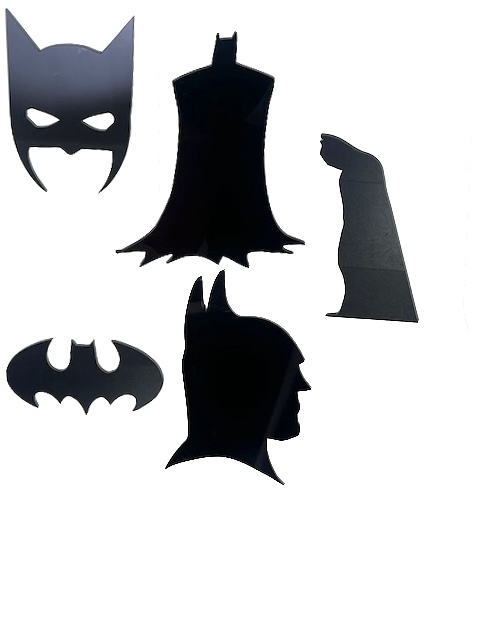
In this post, we help you create the Dark Knight Silhouettes: Batman Wall Art Collection Laser Cutting Creation.
This laser-cut Batman wall art collection captures the essence of the Dark Knight through striking silhouettes and symbols. This project features iconic shapes like Batman’s cowl, logo, and profile, bringing a touch of Gotham to any room. Perfect as a gift for Batman fans or as a stylish addition to your space, these designs are easy to recreate.
- The Dark Knight Silhouettes: Batman Wall Art Collection laser cutting Creation is a wall artwork.
- A fun gift for children.
- The project is constructed using acrylic or MDF .
- It is an an easy Creation, and I estimate it should be completed in 1.25 hours.
However, the time required to complete this will depend on the laser cutter used, how large the project is, and your familiarity with laser cutting. If you think the estimated timing should be adjusted, feel free to let me know via a comment below.
The free design can be downloaded here. (please notify me if the link is down)
Clear assembly instructions
Step 1. Get materials prepared for the project

- Acrylic: Choose the acrylic colour and use a protective film if required.
- MDF: Prepare MDF by painting it with a white undercoat and selecting a paint colour to finish after the laser cutting.

Step 2. Load and prepare the design file

- download the design file via the provided source link included on the project page.
- Unzip the file to access the SVG.
- Load the SVG into your laser cutting software.

Step 3. Prepare laser cutter settings

- Adjust the design size to fit your chosen material dimensions.
- Set the appropriate laser parameters:
- Cut: Specify power and speed for clean cuts.
- Use your laser cutter’s guidelines to determine material-specific settings.

Step 4. Run the laser cutter

- Place your chosen material onto the laser bed surface.
- Run the cutting process.

Step 5. Clean and prepare pieces after cutting

- For MDF: Use a damp cloth to remove smoke marks. Paint the layers once clean. Spray paint gives the best finish.
- For Plywood: Clean smoke residue with a damp rag, then apply stain or dye.
- For Acrylic: Remove protective film after cutting.

Step 6. Assemble and secure all layers

- Attach a hanging mechanism, such as adhesive strips, to the back of the artwork.
- Verify that the mechanism is suitable for the wall surface.

That’s it — you’ve completed Dark Knight Silhouettes: Batman Wall Art Collection! Enjoy seeing the finished result come together.

     If you enjoyed this project, please share your experience and leave a comment below.
Questions about this project?
- 20 Laser Engraving Tips
- 50 Laser Cutting tips
- Create sample swatches of your paints, stains and dyes for laser cutting
- Leave a question
The completed Dark Knight Silhouettes: Batman Wall Art Collection