Intro
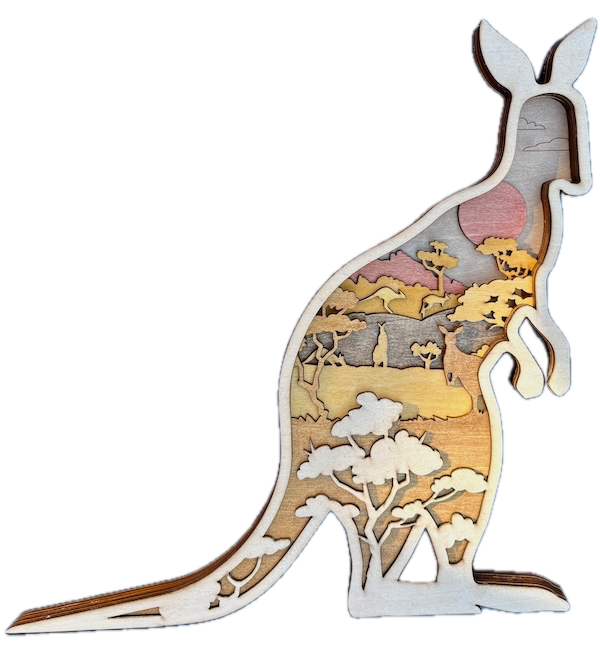
In this project, we help you create the Hop into the Outback! Laser Cutting Design.
Bring the beauty of the Australian Outback into your home with this stunning multi-layered kangaroo-shaped artwork! Inside the kangaroo silhouette, you'll discover a vibrant bushland scene featuring iconic Australian trees, wildlife, and rolling hills beneath a sunset sky. The layered design creates striking depth and texture, making it perfect for nature lovers and craft enthusiasts. With a downloadable SVG file and tips, you can easily laser cut this eye-catching piece for yourself or as a unique gift.
- The Hop into the Outback! laser cutting Design is a wall artwork.
- A popular gift for all ages .
- This design is created using plywood.
- It is an an intermediate Design, and I believe the project can be completed in 2.75 hours.
However, the time required for completion will depend on the laser cutter you use, how large the project is, and your individual experience level. If you believe the estimated timing should be adjusted, feedback is welcome via a comment below.
The free design can be downloaded here. (please notify me if the link is down)
Simple step-by-step guide
Step 1. Prepare materials before starting

- Plywood: Choose stains or dyes to be applied after laser cutting to enhance the natural wood texture.

Step 2. Prepare design files for cutting

- download the design file using the source link available on the project page.
- Unzip the file to access the SVG.
- Load the SVG into your laser cutting software.

Step 3. Set laser parameters for cutting

- Adjust the design size to fit your chosen material dimensions.
- Set the appropriate laser parameters:
- Cut: Specify power and speed for clean cuts.
- Score: Specify power and speed to ensure the scoring can be seen after staining.
- Consult the manufacturer’s guidelines for settings specific to each material.

Step 4. Cut all required layers

- Position your material securely on the laser bed.
- Run the scoring and cutting process.

Step 5. Clean and finish the cut pieces

- For Plywood: Wipe smoke marks away with a slightly damp rag. Apply the wood stain or dye.

Step 6. Build the final layered design

- Align the layers carefully to ensure proper alignment of the design.
- Use appropriate adhesives:
- Wood Glue for plywood.
- Use clamps to secure the layers while the adhesive dries.
- A gloss spray enhances and protects the artwork for plywood.

Step 7. Get the finished project ready to display

- Attach a hanging mechanism, such as adhesive strips, to the back of the artwork.
- Verify that the mechanism is suitable for the wall surface.

That’s it — you’ve completed Hop into the Outback!! Enjoy the finished design and the satisfaction of making it yourself.

     If you enjoyed this project, please share your experience and leave a comment below.
Need some help?
- Create sample swatches of your paints, stains and dyes for laser cutting
- Laser Cutting: A Beginner’s Guide to Getting Started
- xTool P2 Laser Cutter
- Leave a question
The completed Hop into the Outback!