Outline
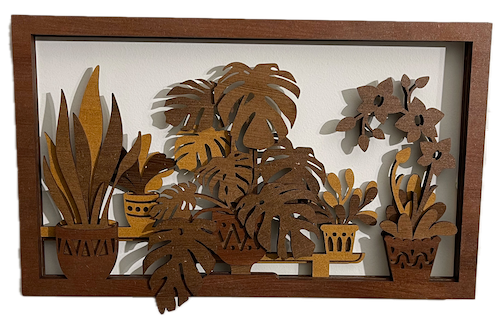
In this post, we help you create the Layered Leafscape Laser Cutting Design.
This artwork features a beautiful arrangement of leafy plants, intricately crafted with five distinct layers to create depth and dimension. Each layer showcases various plant species in decorative pots, adding a rich and textured effect. Encased in a wooden frame, this piece brings the serene beauty of nature indoors, perfect for any room.
- The Layered Leafscape laser cutting Design is a wall artwork.
- Ideal as a gift for all ages.
- This project uses MDF or plywood.
- It is an a challenging Design, and I expect the design can be completed in 4.75 hours for MDF or 3.75 hours for plywood.
However, the total time to complete this will depend on the laser cutter in use, the overall size of the project, and your individual experience level. If you feel the time estimate should be adjusted, feel free to share your thoughts via a comment below.
The free design can be downloaded here. (please notify me if the link is down)
Assembly guide
Step 1. Get materials prepared for the project

- MDF: Prepare MDF by painting it with a white undercoat and selecting paint colours to finish after the laser cutting.
- Plywood: Choose stains or dyes to be applied after laser cutting to enhance the natural wood texture.

Step 2. Prepare the design file for laser cutting

- obtain the design file through the source link available on the project page.
- Unzip the file to access the SVG.
- Load the SVG into your laser cutting software.

Step 3. Prepare laser cutter settings

- Adjust the design size to fit your chosen material dimensions.
- Set the appropriate laser parameters:
- Cut: Specify power and speed for clean cuts.
- Use the manufacturer’s guidance when selecting material-specific parameters.

Step 4. Run the laser cutter

- Place the selected material onto the laser bed.
- Run the cutting process for all required layers.
- Ensure that the layers align correctly as they are cut.

Step 5. Clean up after laser cutting

- For MDF: Wipe smoke marks away with a slightly damp rag. Paint the layers with your chosen colours. Spray paint is preferable to canned paint.
- For Plywood: Wipe smoke marks away with a slightly damp rag. Apply the wood stain or dye.

Step 6. Secure and assemble all layers

- Align the layers carefully to ensure proper alignment of the design.
- Use appropriate adhesives:
- Wood Glue for MDF or plywood.
- Use clamps to secure the layers while the adhesive dries.
- For MDF and plywood, use a gloss spray to enhance and protect the artwork.

Step 7. Ready the piece for mounting

- Attach a hanging mechanism, such as adhesive strips, to the back of the artwork.
- Verify that the mechanism is suitable for the wall surface.

That’s it — you’ve completed Layered Leafscape! Enjoy seeing the finished result come together.

     If you enjoyed this project, please share your experience and leave a comment below.
The completed Layered Leafscape