Outline
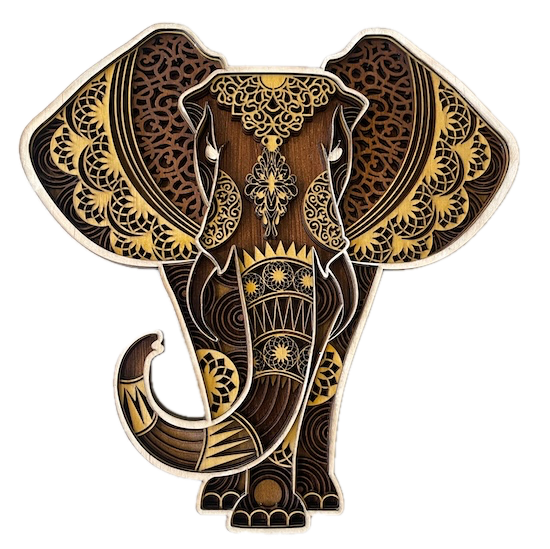
In this project, we help you create the Majestic Elephant: Mandala Elegance Laser Cutting Work.
This stunning laser-cut elephant wall art showcases intricate mandala-style patterns across its ears and body, combining earthy wood tones with golden accents. The detailed design adds depth and complexity, capturing the majestic presence of an elephant with a blend of traditional and modern art. Perfect as a statement piece, this layered artwork offers beauty and symbolism, making it an ideal addition to any space that embraces cultural or natural themes.
- The Majestic Elephant: Mandala Elegance laser cutting Work is a wall artwork.
- A meaningful gift for all ages.
- This laser cut project uses acrylic or MDF or plywood.
- It is an an intermediate Work, and I expect the design can be completed in 3 hours for acrylic, 3.75 hours for MDF or 3 hours for plywood.
However, the time it takes to complete this design will depend on the laser cutter used, the final dimensions of the design, and your individual experience level. If you think the timing should be adjusted, please let me know via a comment below.
The free design can be downloaded here. (please notify me if the link is down)
Beginner-friendly instructions
Step 1. Prepare the required materials

- For all materials, use the darkest colour at the back, and gradually lighten the colours until the front colour is close to white.
- Acrylic: Choose the acrylic colour and use a protective film if required.
- MDF: Prepare MDF by painting it with a white undercoat and selecting a paint colour to finish after the laser cutting.
- Plywood: Choose stains or dyes to be applied after laser cutting to enhance the natural wood texture.

Step 2. Download and open the design file

- access the source link to download the design file supplied on the project page.
- Unzip the file to access the SVG.
- Load the SVG into your laser cutting software.

Step 3. Set up your laser cutter and settings

- Adjust the design size to fit your chosen material dimensions.
- Set the appropriate laser parameters:
- Cut: Specify power and speed for clean cuts.
- Refer to your laser cutter’s guidelines for material-specific settings.

Step 4. Carry out the laser cutting steps

- Set the material in place on the laser bed.
- Run the cutting process.

Step 5. Carry out post-cut cleanup

- For MDF: Use a damp cloth to remove smoke marks. Paint the layers once clean. Spray paint gives the best finish.
- For Plywood: Clean smoke residue with a damp rag, then apply stain or dye.
- For Acrylic: Remove protective film after cutting.

Step 6. Complete the assembly process

- Align the layers carefully to ensure proper alignment of the design.
- Use appropriate adhesives:
- Acrylic Adhesive for acrylic.
- Wood Glue for MDF or plywood.
- Use clamps to secure the layers while the adhesive dries. When joining the front layers, placing a heavy object on top than using clamps may be more manageable.
- For MDF and plywood, use a gloss spray to enhance and protect the artwork.

Step 7. Get the finished project ready to display

- Attach a hanging mechanism, such as adhesive strips, to the back of the artwork.
- Verify that the mechanism is suitable for the wall surface.

After working through the steps, you’ve completed Majestic Elephant: Mandala Elegance! It’s now ready to be displayed and enjoyed.

     If you enjoyed this project, please share your experience and leave a comment below.
Need help with this build?
- Leave a question
The completed Majestic Elephant: Mandala Elegance