Overview
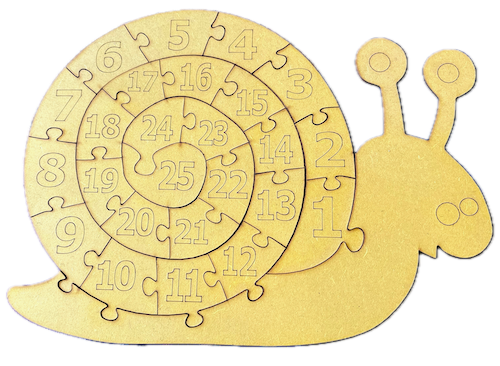
In this page, we help you create the Snail's Number Spiral Adventure Laser Cutting Creation.
This delightful snail-shaped puzzle is perfect for helping kids learn their numbers from 1 to 25. Each piece fits snugly into place, creating a fun spiral pattern that engages young minds while enhancing number recognition and fine motor skills. Ideal as a gift or an educational tool, this laser-cut project combines learning with creativity. The intricate puzzle pieces are durable and easy to handle, making it great for toddlers and preschoolers.
- The Snail's Number Spiral Adventure laser cutting Creation is a educational toy.
- Suitable as a gift for children.
- This build uses MDF or plywood.
- It is an an easy Creation, and the project should generally be completed in 1.5 hours for plywood and MDF.
However, the time required for completion will depend on the laser cutter you use, the size of the design, and your individual experience level. If you feel the completion time should be adjusted, feedback is welcome via a comment below.
The free design can be downloaded here. (please notify me if the link is down)
Project instructions
Step 1. Get materials prepared for the project

- Plywood and MDF: Choose stains or dyes to be applied after laser cutting to enhance the natural wood texture.

Step 2. Ready the design file for cutting

- obtain the design file through the source link located on the project page.
- Unzip the file to access the SVG.
- Load the SVG into your laser cutting software.

Step 3. Configure the cutter for this project

- Adjust the design size to fit your chosen material dimensions.
- Set the appropriate laser parameters:
- Cut: Specify power and speed for clean cuts and sufficient power for engraving to ensure it can be seen after applying dye or stain.
- Refer to your laser cutter’s guidelines for material-specific settings.

Step 4. Run the laser cutter

- Lay the material flat on the laser bed.
- Run the cutting and engraving process for all pieces.

Step 5. Finish materials after cutting

- For Plywood and MDF: Wipe smoke marks away with a slightly damp rag. Apply the wood stain or dye.

Step 6. Join the layers together

- A gloss spray enhances and protects the artwork for plywood and MDF.

With the final step done, you’ve completed Snail's Number Spiral Adventure! Step back, admire your work, and enjoy the finished piece.

     If you enjoyed this project, please share your experience and leave a comment below.
Need a hand?
- Leave a question
The completed Snail's Number Spiral Adventure