Opening
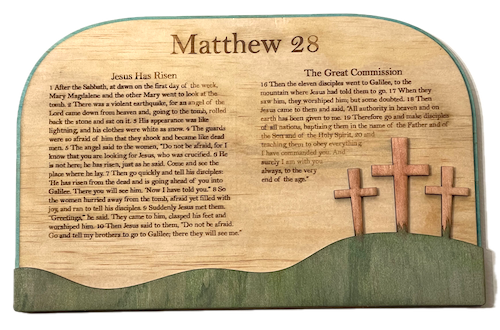
In this project, we help you create the Stone Rolled Away Laser Cutting Build.
Celebrate faith with this beautifully crafted wooden plaque featuring Matthew 28. Engraved with the passages "Jesus Has Risen" and "The Great Commission," it includes a serene landscape with three crosses. Perfect for home or church decor, this piece serves as an inspiring reminder of the resurrection and the mission of discipleship.
- The Stone Rolled Away laser cutting Build is a wall artwork.
- A popular gift for all ages.
- The project is made using plywood.
- It is an an easy Build, and I believe the project can be completed in 2.75 hours.
However, the time required for completion will depend on the laser cutter you use, the final dimensions of the design, and your familiarity with laser cutting. If you think the estimated timing should be adjusted, you can share feedback via a comment below.
The paid design can be downloaded here. (please notify me if the link is down)
Easy-to-follow instructions
Step 1. Select and prepare your materials

- Plywood: Choose stains or dyes to be applied after laser cutting to enhance the natural wood texture.

Step 2. Download and prepare the design file

- download the design file using the source link located on the project page.
- unzip the file to open the design.
- load the design into your preferred laser software.

Step 3. Set up your laser cutter and settings

- Adjust the design size to fit your chosen material dimensions.
- Set the appropriate laser parameters:
- Cut: Specify power and speed for clean cuts.
- Use your laser cutter’s guidelines to determine material-specific settings.

Step 4. Run the laser cutter

- Position the material on the laser bed.
- Run the cutting process for all required layers.
- Ensure that the layers align correctly as they are cut.

Step 5. Finish and clean cut components

- For MDF: Wipe smoke marks away with a slightly damp rag. Paint the layers with your chosen colours. Spray paint is preferable to canned paint.
- For Plywood: Wipe smoke marks away with a slightly damp rag. Apply the wood stain or dye.
- Use appropriate adhesives:
- Wood Glue for plywood.
- Use clamps to secure the layers while the adhesive dries.

Step 6. Join the layers together

- A gloss spray enhances and protects the artwork for plywood.
- Attach a hanging mechanism, such as adhesive strips, to the back of the artwork.
- Verify that the mechanism is suitable for the wall surface.

Great work completing Stone Rolled Away! Put it on display and enjoy the finished look.

     If you enjoyed this project, please share your experience and leave a comment below.
Questions about this project?
- Laser Cutting: A Beginner’s Guide to Getting Started
- Laser cut items – masking vs cleaning with a wet rag
- 20 Laser Engraving Tips
- Leave a question
The completed Stone Rolled Away