Introduction
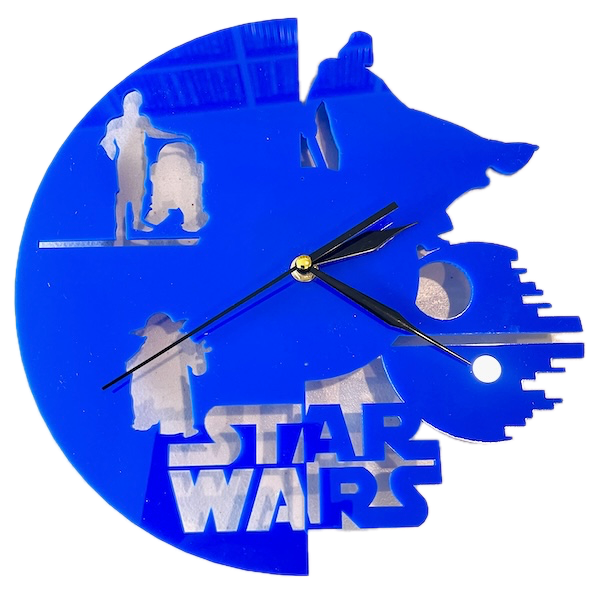
In this post, we help you create the Time in a Galaxy Far, Far Away Laser Cutting Design.
This Star Wars-themed clock is a must-have for any fan! Created from acrylic, this wall clock features iconic silhouettes from the beloved Star Wars universe, including the Death Star, R2-D2, Darth Vader, and Yoda. This clock is both a functional and decorative piece that brings the excitement of the movies into your home. Get ready to showcase your love for Star Wars by downloading the design files and creating your laser-cut masterpiece!
- The Time in a Galaxy Far, Far Away laser cutting Design is a wall clock.
- Ideal as a gift for all ages.
- The design uses acrylic .
- It is an an easy Design, and I estimate it should be completed in 90 minutes.
However, the time involved in completing this will depend on the laser cutter used, how large the project is, and your familiarity with laser cutting. If you believe the time estimate should be adjusted, please provide feedback via a comment below.
The free design can be downloaded here. (please notify me if the link is down)
Project instructions
Step 1. Select and prepare your materials

- Acrylic: Choose the acrylic colour and use a protective film if required.
- Clock mechanism: Purchase the appropriate clock mechanism and hand colour. Ensure your clock mechanism has a sufficiently long shaft to allow the shaft to pass through the material.

Step 2. Prepare design files for cutting

- download the design file via the provided source link included on the project page.
- Unzip the file to access the SVG.
- Load the SVG into your laser cutting software.

Step 3. Adjust laser settings for the materials

- Adjust the design size to fit your chosen material dimensions.
- Ensure the middle hole is sufficiently large to fit the clock mechanism.
- Set the appropriate laser parameters:
- Cut: Specify power and speed for clean cuts.
- Follow your laser cutter’s recommended settings for each material type.

Step 4. Cut all required layers

- Place the selected material onto the laser bed.
- Run the cutting process.

Step 5. Finish and clean cut components

- For Acrylic: Remove any protective film from the material after cutting.

Step 6. Join the layers together

- Align the layers carefully to ensure proper alignment of the design.
- Use appropriate adhesives:
- Acrylic Adhesive for acrylic.
- Use clamps to secure the layers while the adhesive dries.
- Attach the clock mechanism and hands.

Step 7. Prepare the design for mounting

- Attach a hook to the wall and hang the clock.

Nice job finishing Time in a Galaxy Far, Far Away! Take a moment to admire the craftsmanship and enjoy the finished result.

     If you enjoyed this project, please share your experience and leave a comment below.
The completed Time in a Galaxy Far, Far Away